Contacts
- 4.3
- Rating
- 5.00B
- Installs
- Free
- Price

 Analysis by App-foxy
Keeping contacts tidy sounds simple until a phone contains old numbers, duplicate entries, work addresses, emergency details, and people saved under slightly different names. I spent time using Contacts as an everyday address book rather than treating it as a place to look up a number once in a while. My impression is that it works best when you make it part of a repeatable routine: save people carefully, review the account used for storage, and use search instead of endlessly scrolling.
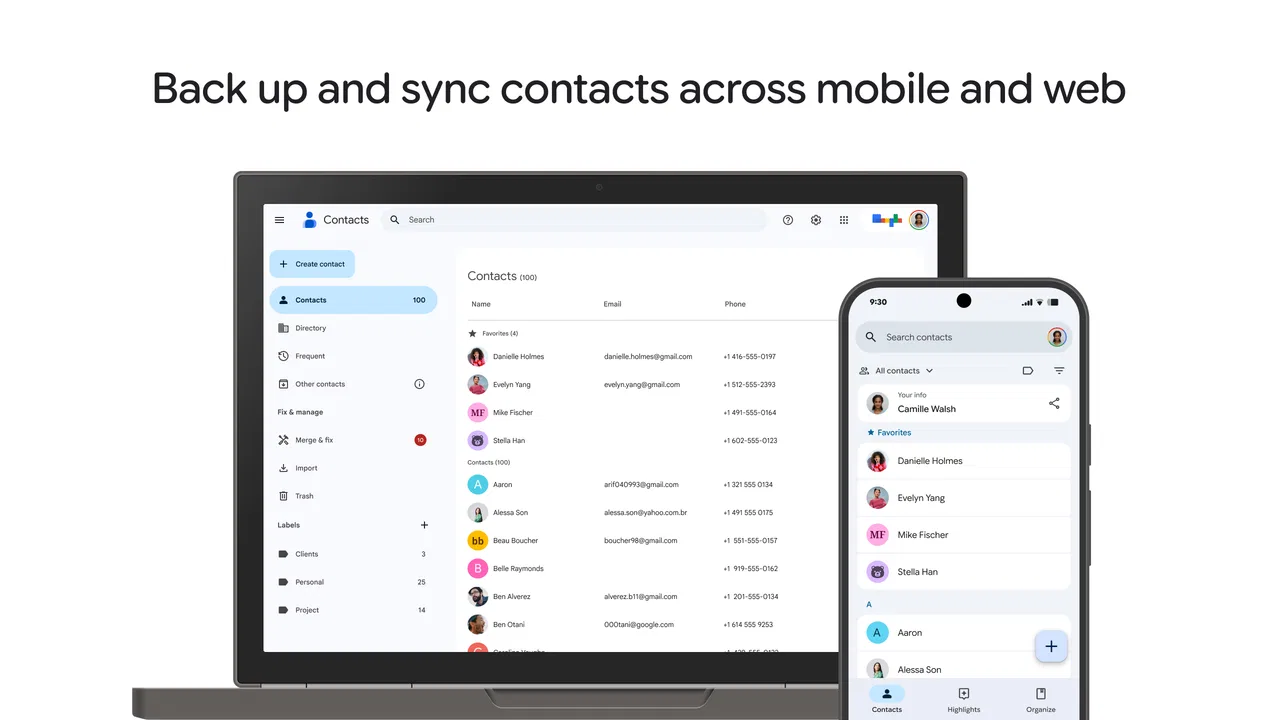
Contacts is a free communication app from Google LLC for Android and iOS. It is suitable for Everyone, and its central purpose is straightforward: keep your address book available across the places where you use your Google account. That makes it more useful than a basic phone-only list, especially if you change devices or need to reach the same people from more than one screen.
The app has been available since December 7, 2015, and its reach is enormous, with over five billion installs. It holds a 4.3 average from around two million ratings, alongside roughly thirty thousand written reviews. Those figures do not tell me whether it will fit every person, but they do reflect how deeply it has become part of the standard Android communication workflow.
In-Depth Coverage of Contacts
How I use Contacts as a dependable daily address book
My baseline workflow starts with saving a contact at the moment I actually need the person again. I add a recognizable name, the main phone number, and a label such as mobile, work, or home when that distinction matters. This small habit is more important than it sounds. A contact named only “Alex” may be easy to recognize today, but a fuller name or a note about the relationship makes the entry much more useful months later.
Search is the feature I rely on most. Instead of browsing alphabetically, I type part of a name, a company, or a number. This is particularly helpful when a contact has several telephone numbers or when I remember the organization but not the person’s surname. The app feels quickest when I treat it as a searchable database rather than a visual list.
A realistic example is arranging a repair visit. I search for the technician’s name, check the number before calling, and use the saved address or other identifying information to make sure I have the right person. Later, if the same business calls from another number, I can update the existing record instead of creating a second entry. That prevents the gradual clutter that makes many address books frustrating.
The contact page is also useful for separating communication methods. A person may have a phone number, email address, postal address, birthday, and several labels. I do not fill every field automatically. I add only information I am likely to use, because an overfilled record becomes harder to scan. For a family member, an address may be valuable; for a delivery contact, the phone number and company name may be enough.
One practical habit is checking the account destination before saving. Contacts can become confusing when some entries live in a Google account while others remain associated with the device or another account. If I want an entry to follow me to another phone, I make sure I am saving it where I expect. This is one of the most important choices in the app, yet it is easy to overlook during a hurried call.
That account-based approach is the main reason I prefer this app to a purely local address book. A local list can be perfectly adequate for someone who never changes phones, but it becomes less convenient after a reset, a replacement device, or a switch between platforms. Contacts is designed around continuity, so it suits people who want their address book to remain connected to their wider Google setup.
The first settings I would check
Before adding hundreds of people, I would review which account is active and how new contacts are stored. The exact screens can vary with the device and operating system, but the principle is stable: know where your entries are going. If you use more than one account, an accidental choice can split your address book into separate groups and make a person appear to have vanished.
I also check which contact lists are visible. Hiding a list can make the app look incomplete even though the records still exist. This is useful when I want to focus on a particular account, but it can cause confusion if I forget that a filter is active. When someone is missing, I first inspect the displayed account or list before assuming the contact was deleted.
Google’s contact management tools can help identify duplicates, and I treat that process carefully rather than merging everything automatically. Two entries with the same name may belong to different people, while two similar entries may genuinely be the same person. I compare numbers, email addresses, and any identifying details before accepting a merge. Cleaning duplicates is valuable, but careless merging can remove the clarity that the cleanup was meant to create.
Another worthwhile check is whether the app is being used as the default place for new entries on the phone. If the phone’s dialer, messaging app, and Contacts app do not share the same source, the experience can feel inconsistent. A number saved from a call may not appear exactly where I expect, or a newly created entry may use a different account. I recommend making a test contact and then searching for it from the places you normally communicate.
You May Also Like

 8 Ball Pool
8 Ball Pool Is Built on Rivalries, Rematches, and Routine
A close look at the rivalries, rematches, shared routines, and unanswered safety questions that turn a quick pool match into a persistent mobile community.

 Samsung Music
Samsung Music’s Quiet Strength Is Playing What You Already Own
Its reach comes less from spectacle than from dependable access to a personal library. That simplicity is both the app’s strongest retention engine and its ceiling.

 AccuWeather: Weather Radar
AccuWeather Review: A Quick, Clear Forecast for Everyday Decisions
For everyday plans, the best forecast is the one you can understand quickly. AccuWeather makes rain timing, radar, and local conditions easy to act on, with a few trade-offs.

 Hill Climb Racing
Why Hill Climb Racing Still Turns Crashes Into One More Run
A tiny car, a bumpy hill and one more upgrade: Hill Climb Racing keeps resurfacing because its simple chaos makes every near-miss feel personal.

 AliExpress - Shopping App
AliExpress Makes Global Shopping Feel Personal, but Shoppers Bear the Risk
AliExpress turns a global marketplace into a pocket-sized discovery engine. Its reach is useful, its shopping loop compelling, and its trade-offs easy to miss.

 Lords Mobile: Kingdom Wars
Lords Mobile Is a Kingdom-Building Routine, Not a Quick Match
A case-by-case verdict on the building, battles, device demands, and social commitments that make Lords Mobile rewarding for some players and exhausting for others.
More From Our News Desk



Privacy is part of this setup. I avoid putting sensitive information into a contact field simply because there is room for it. A contact list may be convenient, but it is still a personal record containing details about other people. My rule is to store information that supports communication and organization, not a complete profile of everyone I know.
Shortcuts and habits that make it faster
The fastest improvement comes from standardizing names. I use the same pattern for similar entries, especially businesses and service providers. For example, placing the company name in the organization field and the person’s name in the name field makes later searches more predictable. It also helps when several people work for the same company.
Labels are useful when they answer a question I will actually ask. “Work,” “family,” or “school” can be meaningful, but creating a label for every temporary group may produce more maintenance than value. I prefer a small number of clear categories and rely on search for everything else. The app rewards consistency more than elaborate organization.
When I receive a message from an unknown number that I may need later, I save it immediately if the relationship is clear. I do not wait until the end of the day, when context has disappeared. I add a short identifying detail, such as the service or project connected with the number. This is more reliable than hoping I will remember who it was after several weeks.
I also use the contact record as a handoff point between communication methods. If a phone call becomes an email conversation, the saved email address keeps the person’s details together. If I need to send an address or share a number, I can retrieve it from one record rather than searching through old messages. That is a quiet strength: the app reduces the number of places where I need to remember information.
For people with multiple numbers, I mark the purpose of each one instead of leaving several unlabeled entries. This avoids calling a personal number for a work matter or sending a message to a line that is no longer monitored. It takes a few seconds during setup and saves more time later.
A further useful pattern is periodic maintenance after a life change. When I move, change jobs, or replace a number, I update the important contacts while the information is fresh. I do not try to clean the entire address book in one session. A short review of frequently used people is more realistic and keeps the records that matter most accurate.
Where the app is strong, and where it stops short
Contacts is strongest for people who want a familiar, searchable address book that can remain available beyond one handset. It is a good match for Android users already using Google services, families sharing frequent communication, students managing school and personal numbers, and anyone who regularly replaces or resets devices. The free price also makes it easy to try without adding another subscription to a basic need.
It is less compelling for someone who wants a highly specialized relationship manager. Contacts can hold useful details, but it is not a full customer-management system, a project database, or a dedicated private journal. If your work depends on detailed interaction histories, task reminders, sales pipelines, or complex tagging, a specialist tool will be a better fit.
It also may not be the right choice for a person who wants an entirely local address book with no account-centered workflow. A local-only approach can offer a clearer sense of control for some users, particularly those who keep their phone unchanged and do not need cross-device access. Contacts makes more sense when convenience and continuity matter more than keeping every record confined to one device.
Duplicate management deserves a realistic warning. Cleanup tools are helpful when an address book has accumulated repeated entries, but they cannot understand every personal distinction. A parent and child with the same name, or two colleagues at different companies, may look similar to an automated suggestion. I always inspect proposed combinations rather than treating cleanup as a one-tap chore.
Another limitation is that the quality of the experience depends on the wider phone environment. The dialer, messaging app, account selection, and device settings all influence how smoothly a saved contact appears. If those pieces are configured differently, Contacts may seem inconsistent even when the records are intact. The solution is usually to check account visibility and default behavior, not to recreate entries repeatedly.
Questions I would settle before switching
If you are wondering whether contacts will follow you to a new device, the practical answer depends on where you save them. Entries stored in the account you use for synchronization are intended for access across that account, while entries saved only to a device or another location may not behave the same way. I would verify the destination with a test contact before relying on the setup for an important move.
If a contact appears to be missing, I would search by both name and number, then inspect visible accounts and lists. A filtered view or an unexpected account is a more likely explanation than a need to enter the person again. Recreating the entry can leave you with duplicates, so I treat it as the last step.
If you want to share a contact, I would first open the record and review which fields are included. A contact can contain more information than the recipient needs, so I remove unnecessary details before sending or sharing it through the phone’s available communication options. This is a simple privacy habit that is easy to miss when moving quickly.
If you are changing from another address-book app, I would not import everything without a cleanup plan. Bring the records over, check how names and numbers were mapped, and then review duplicates in small groups. The goal is not merely to transfer data; it is to create a list that remains understandable after the first import.
Finally, if you are concerned about maintaining several versions of the same person, decide on one primary record and update it consistently. Multiple entries may seem convenient in the short term, but they scatter phone numbers and email addresses across search results. A single well-labeled record is usually easier to maintain.
My verdict after building a repeatable routine
After using Contacts with these habits, I see it as a dependable foundation rather than an exciting communication app. Its value comes from reducing small points of friction: finding the right person quickly, keeping details together, and making an address book less dependent on one physical phone. The experience is especially convincing when the account and visibility settings are understood from the beginning.
There is some responsibility on the user. The app cannot decide whether two similar names represent one person, cannot replace a thoughtful naming system, and cannot make a disorganized imported list instantly perfect. People who expect automatic organization may find the cleanup process more hands-on than they hoped. I consider that a fair trade-off for having control over what gets merged and what stays separate.
My recommendation is strongest for anyone who wants a free, familiar way to keep communication details organized across devices. I would recommend starting with a small rule: save important people to the intended account, use descriptive names, label only what helps, and review duplicates before merging. Those four choices make the app feel considerably more capable than a basic scrolling list.
For a person who needs advanced customer records, deep local-only control, or a specialized private database, I would choose another tool. For everyday calls, messages, email addresses, and the occasional move to a new phone, Contacts does the essential work without charging for it. The real strength is not a flashy feature; it is a repeatable address-book routine that stays useful after the moment of saving a number.
In my experience, that makes Google’s Contacts a sensible choice for ordinary communication needs. It is free, rated for Everyone, and developed by Google LLC, but the decision should come down to workflow rather than popularity. If you are willing to spend a little time choosing the right account and maintaining names consistently, it can become the quiet, reliable center of your phone’s communication habits.
FAQs for Contacts
01What features does the Contacts app offer?
The Contacts app provides a comprehensive platform for managing and organizing your contacts. It offers features like contact syncing across devices, custom labels, integration with email and messaging apps, and advanced search options. Additionally, it supports group creation, contact imports, and backup functionalities to ensure your data is safe and easily accessible.
02Is the Contacts app secure and how does it protect my data?
Yes, the Contacts app prioritizes your privacy and data security. It employs encryption protocols to protect your information both in transit and at rest. The app also includes options for password protection and biometric authentication to add an extra layer of security, ensuring that only you can access your contact data.
03Can I customize the interface of the Contacts app?
Absolutely. The Contacts app allows for a high degree of customization. You can adjust the layout, choose themes, and set personalized ringtones for specific contacts. Additionally, it offers widgets for quick access and allows you to customize contact details views, ensuring the app suits your personal preferences and needs.
04How does the Contacts app handle duplicate contacts?
The Contacts app includes a built-in tool for managing duplicate contacts. It scans your contact list for duplicates and offers options to merge or delete them. This feature ensures your contact list stays organized and clutter-free, saving you time and preventing confusion when searching for contacts.
05Is the Contacts app compatible with all devices?
The Contacts app is designed to be compatible with both Android and iOS devices. It supports a wide range of operating system versions, ensuring seamless integration and functionality. Regular updates are provided to maintain compatibility with the latest OS releases, ensuring a smooth and consistent user experience.
Pros
- User-friendly interface with intuitive navigation.
- Seamless integration with cloud services.
- Efficient contact organization and grouping.
- Customizable fields for detailed contact info.
- Quick and responsive search functionality.
Cons
- Lacks advanced privacy settings.
- Limited support for contact backups.
- No dark mode option available.
- Occasional sync issues with some devices.
- Ads can be intrusive in the free version.

Contacts
Gallery